
What Is Autodesk Assistant in Civil 3D 2027?
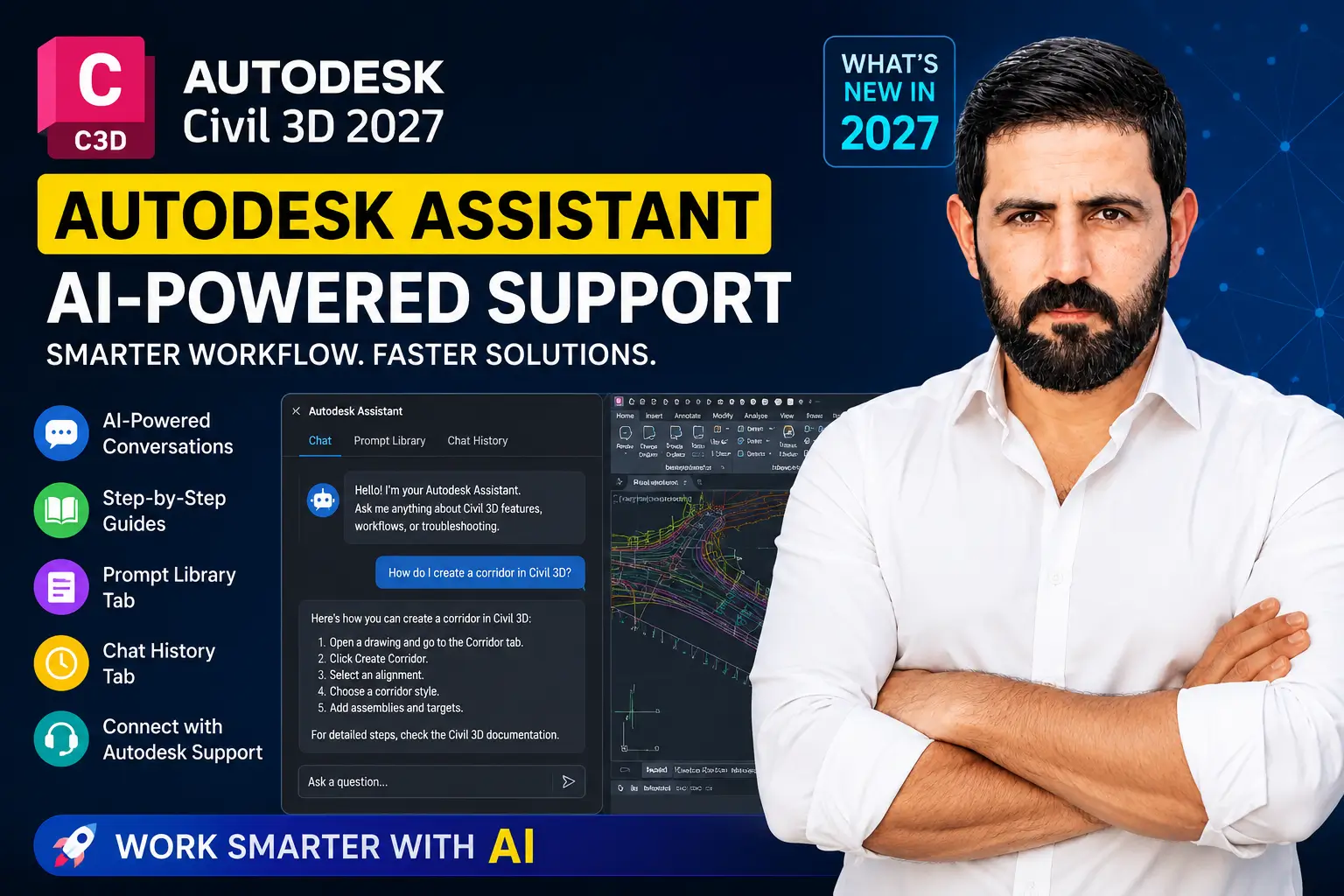
Lets dive into what is Autodesk Assistant in Civil 3D 2027, it is an AI-powered support and productivity feature designed to help users find answers, understand workflows, and complete Civil 3D tasks more efficiently.
Instead of searching through help files, forums, or long tutorial videos, users can ask questions in natural language and receive guided responses directly inside the Civil 3D environment.
For civil engineers, CAD technicians, BIM specialists, survey professionals, and infrastructure designers, this can save valuable project time and reduce workflow interruptions.
Why Autodesk Assistant Matters in Civil 3D 2027
Civil 3D is a powerful design platform, but it can also be complex for new users and time-consuming for experienced professionals. Tasks like corridor modeling, surface troubleshooting, pipe network setup, grading, labels, profiles, and data shortcuts often require detailed knowledge.
Autodesk Assistant helps bridge that gap by giving users faster access to relevant guidance.
With AI support built into Civil 3D 2027, users can:
- Ask Civil 3D questions in simple language
- Get workflow guidance faster
- Review previous conversations
- Use prompt examples for better results
- Explore experimental AI-powered drawing assistance
For firms that want to improve design efficiency, reduce support delays, and train teams faster, Autodesk Assistant is a valuable feature to understand.
Key Features of Autodesk Assistant in Civil 3D 2027
1. Conversational AI Support
One of the biggest improvements in Civil 3D 2027 is the refreshed conversational interface. Users can interact with Autodesk Assistant in a more natural way, similar to chatting with a support expert.
You can ask questions such as:
- How do I create a corridor in Civil 3D?
- Why is my surface not updating?
- How do I fix alignment label issues?
- What is the best workflow for pipe network design?
- How do I manage data shortcuts?
- How do I create a profile view?
The assistant can respond with clear explanations and suggested steps.
This is useful for both beginners and experienced users. Beginners can learn Civil 3D faster, while professionals can quickly resolve common issues without leaving their design environment.
2. Step-by-Step Civil 3D Workflow Guidance
Autodesk Assistant can help users understand common Civil 3D workflows by providing step-by-step guidance.
This can support tasks such as:
- Corridor creation
- Surface management
- Pipe network setup
- Pressure network workflows
- Alignment and profile creation
- Quantity takeoff
- Grading workflows
- Data shortcuts
- Labeling and styles
- Drawing troubleshooting
For many Civil 3D users, the biggest challenge is not knowing which command or workflow to use next. Autodesk Assistant helps reduce that confusion by guiding users through the process.
This can be especially helpful for engineering students, junior CAD technicians, and professionals transitioning from AutoCAD to Civil 3D.
3. Prompt Library Tab
Civil 3D 2027 introduces a Prompt Library feature for Autodesk Assistant.
The Prompt Library helps users discover useful prompts and learn how to ask better questions. This is important because the quality of an AI response often depends on how clearly the question is written.
With the Prompt Library, users can:
- Find ready-to-use prompt examples
- Learn better ways to ask Civil 3D questions
- Save time when using AI assistance
- Build repeatable support workflows
- Improve team productivity
For companies using Civil 3D across multiple projects, prompt libraries can help standardize how teams ask technical questions and document solutions.
4. Chat History Tab
Another useful addition is the Chat History feature.
This allows users to review previous conversations with Autodesk Assistant. For project teams, this can be helpful when similar issues appear repeatedly.
With Chat History, users can:
- Revisit previous answers
- Reuse earlier troubleshooting steps
- Track support-related conversations
- Save time on repeated questions
- Improve workflow documentation
For example, if a user previously asked how to fix a surface display issue, they can return to that conversation instead of starting from scratch.
This feature is especially valuable for teams working on long-term infrastructure, land development, roadway, drainage, or subdivision projects.
5. Autodesk Assistant Tech Preview
Autodesk Assistant in Civil 3D 2027 also includes Tech Preview capabilities. These are experimental features that Autodesk is still developing and improving.
The Tech Preview may include AI-powered drawing assistance, object-related support, workflow suggestions, standards checking, and other intelligent tools that help users work more efficiently.
Possible future AI-driven workflows may include:
- Smarter design recommendations
- Automated troubleshooting
- Intelligent command suggestions
- Drawing analysis
- Standards checking
- Workflow optimization
- Predictive error detection
This shows Autodesk’s continued focus on AI-powered design and support tools for civil infrastructure professionals.
Benefits of Autodesk Assistant for Civil Engineers
Faster Problem Solving
Civil 3D users often lose time searching for solutions across help files, forums, videos, and internal documentation.
Autodesk Assistant helps reduce that delay by providing direct answers inside the software environment.
This can be valuable when working on:
- Project deadlines
- Drawing errors
- Labeling issues
- Surface problems
- Corridor updates
- Pipe network settings
- Data shortcut errors
Instead of stopping your workflow, you can ask a question and continue working faster.
Better Learning Experience for Beginners
Civil 3D has a steep learning curve. New users often struggle with understanding how surfaces, alignments, profiles, corridors, sections, pipes, and styles work together.
Autodesk Assistant makes Civil 3D more beginner-friendly by giving users guided explanations.
This is helpful for:
- Civil engineering students
- New CAD technicians
- Entry-level designers
- AutoCAD users learning Civil 3D
- Professionals moving into BIM workflows
For beginners, Autodesk Assistant can act like an on-demand learning guide.
Improved Productivity for Project Teams
For engineering firms, time is money. Every minute spent searching for answers can delay production.
Autodesk Assistant can help teams reduce downtime by providing faster technical support and workflow guidance.
This can improve productivity in areas such as:
- Land development design
- Roadway design
- Site grading
- Stormwater design
- Utility design
- Survey drafting
- BIM coordination
- Infrastructure documentation
When teams solve problems faster, projects move forward with fewer interruptions.
Reduced Dependency on External Support
Autodesk Assistant does not replace expert technical support, but it can reduce the need to contact support for common questions.
Users may be able to solve basic issues independently, including:
- Command confusion
- Style questions
- Display problems
- Workflow steps
- Object selection
- Documentation lookup
For firms with limited CAD management resources, this can be a major advantage.
Who Should Use Autodesk Assistant in Civil 3D 2027?
Autodesk Assistant is useful for almost every type of Civil 3D user, including:
- Civil engineers
- CAD technicians
- Survey professionals
- BIM specialists
- Infrastructure designers
- Highway design engineers
- Land development professionals
- Drainage designers
- Engineering students
- CAD managers
- Project engineers
Whether you are learning Civil 3D for the first time or managing complex infrastructure drawings, Autodesk Assistant can help improve your workflow.
Best Use Cases for Autodesk Assistant
Autodesk Assistant can be especially useful when you need quick help with common Civil 3D tasks.
Use It for Learning Commands
Ask questions like:
- What does this Civil 3D command do?
- How do I create a surface?
- How do I edit an alignment?
- How do I create sample lines?
Use It for Troubleshooting
Ask questions like:
- Why are my contours not displaying?
- Why is my corridor not rebuilding?
- Why is my pipe network not showing in profile view?
- Why are my labels not updating?
Use It for Workflow Guidance
Ask questions like:
- What is the correct workflow for creating a road corridor?
- How do I set up data shortcuts?
- How do I create existing and proposed surfaces?
- How do I calculate earthwork quantities?
Important Note About Accuracy
Because Autodesk Assistant uses AI, users should always review and verify the information before applying it to production drawings.
Some AI-generated or Tech Preview results may not always be accurate, and the feature may continue improving over time.
For professional engineering projects, Autodesk Assistant should be used as a productivity tool, not as a replacement for engineering judgment, CAD standards, or design review.
Is Autodesk Assistant Worth Using in Civil 3D 2027?
Yes, Autodesk Assistant is worth using, especially if you want faster access to Civil 3D help and workflow guidance.
It is most valuable for users who:
- Want to learn Civil 3D faster
- Need quick answers during design work
- Want to reduce time spent searching online
- Work on repetitive Civil 3D problems
- Manage complex drawings and workflows
- Want to explore AI tools in civil engineering software
For professional users, the biggest benefit is speed. Autodesk Assistant can help reduce interruptions and keep users focused on design production.
Final Thoughts
Autodesk Assistant in Civil 3D 2027 is one of the most important AI-related updates for Civil 3D users.
With conversational support, step-by-step guidance, Prompt Library, Chat History, and Tech Preview capabilities, Autodesk is moving Civil 3D toward a smarter and more connected design experience.
For civil engineers, CAD technicians, BIM professionals, and infrastructure designers, this feature can help save time, improve learning, and support better productivity.
As Autodesk continues expanding AI capabilities, tools like Autodesk Assistant will likely become a normal part of daily Civil 3D workflows.
Need Help Learning Civil 3D 2027?
At civil3dpro.com, we help Civil 3D users understand tools, workflows, updates, and best practices for real-world civil engineering projects.
Explore more Civil 3D tutorials, updates, and workflow guides to improve your skills and work faster with Autodesk Civil 3D.

One Comment